AI note taker · Coming soon
Fen listens. Fen writes. You get who said what.
Press record and Fen, a fennec fox with the biggest ears in the desert, writes down every word as people talk, labels each voice, and hands you a summary and the to-dos when you stop.
Your first hour of recording is free. No bot, no account needed.
Three steps, and Fen does the writing
- Tap recordFen's ears go up and he picks up his pen. Meetings, lectures, interviews, appointments.
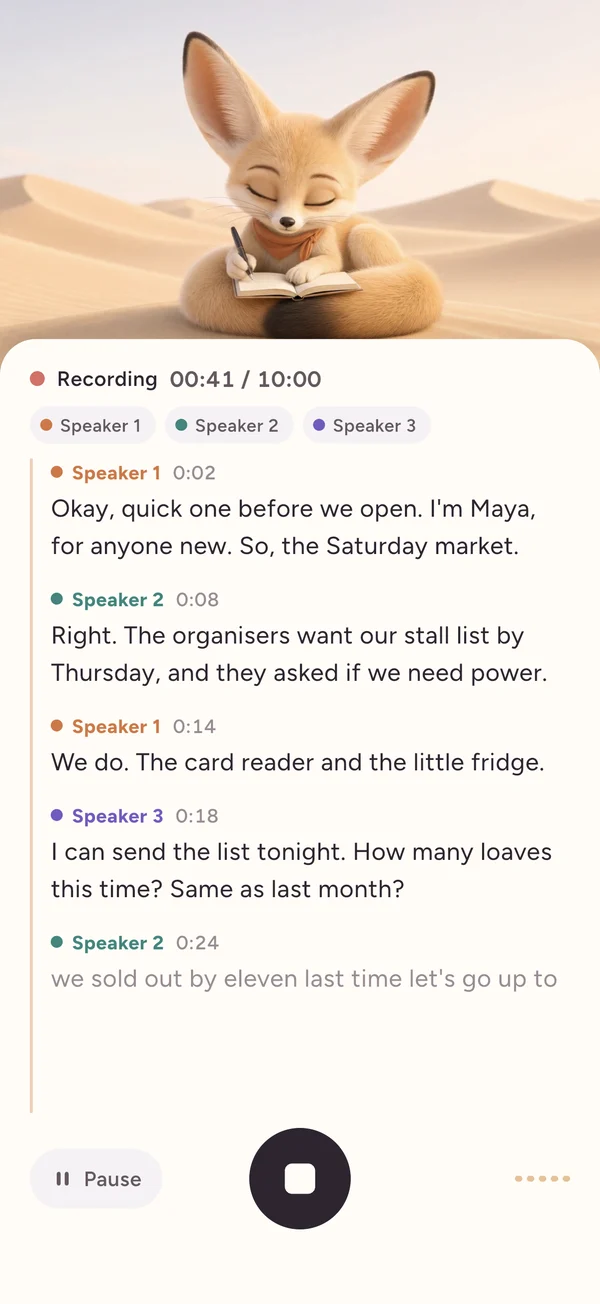
- TalkWords appear as people speak, each voice in its own colour: Speaker 1, Speaker 2, Speaker 3.
- StopA title, the gist, what was decided, the to-dos with who owns them, and names for each speaker.
Live
Every word, as it's said
The transcript writes itself while people talk. Each voice gets a label and a colour, so you can see the conversation take shape. Pause, resume, or lock your phone: Fen keeps listening.
When you stop
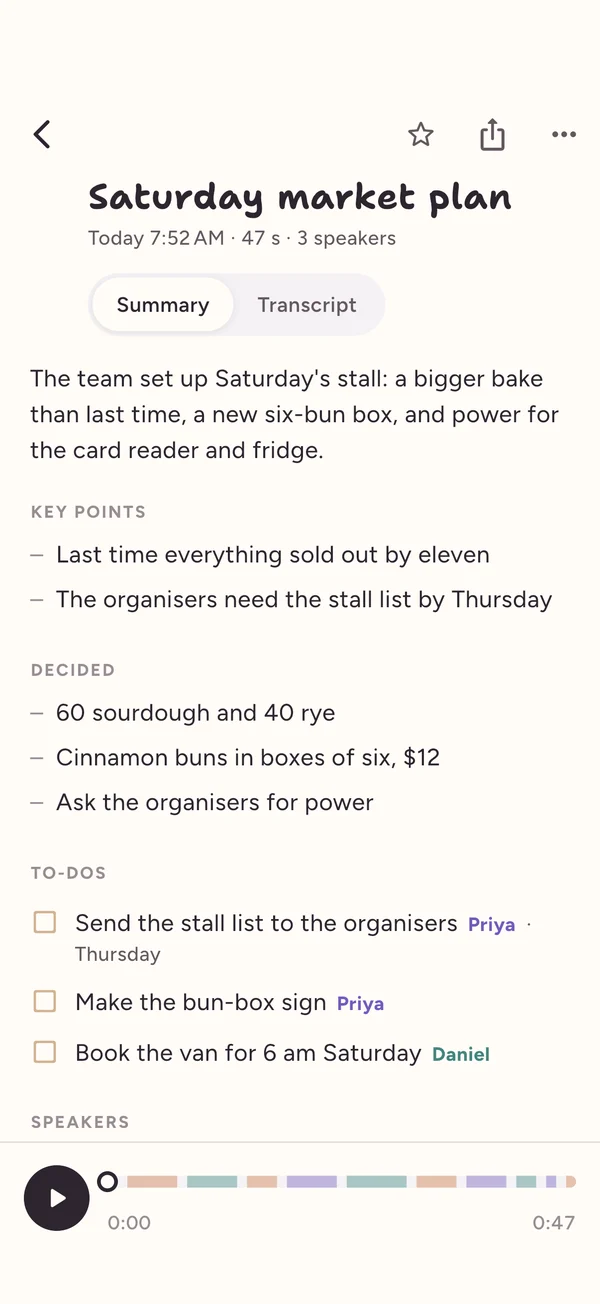
The gist, the decisions, the to-dos
Fen reads back over his notes and writes you a summary: what it was about, what was decided, and what needs doing by whom. Tick off to-dos right in the notes.
Who's who
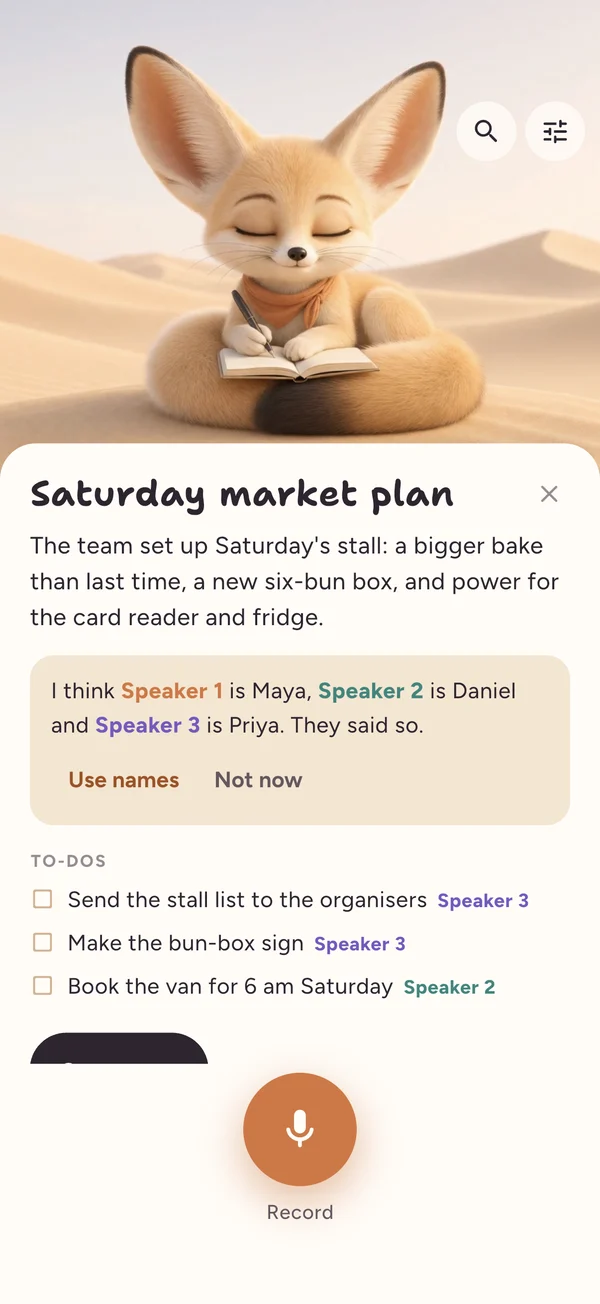
Names, not just Speaker 2
When someone says "I'm Maya" or "thanks, Daniel", Fen notices and suggests the names. One tap and the transcript, the to-dos and the summary all use them.

Search
Find anything anyone said
Search every recording by what was said, not just its title, and jump straight to the moment. Play it back with each word lit up as it's spoken.
Beyond the phone
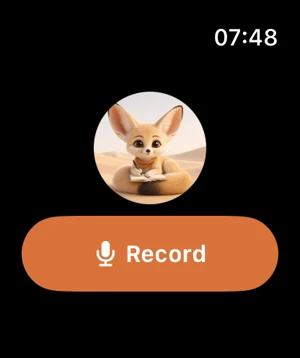
On your wrist and your home screen
Record from Apple Watch and Fen writes it up on your iPhone. Widgets show your latest notes and the next to-do, and a Record with Fen button sits in Control Center and on the Action Button. Android gets widgets too.
Your recordings stay yours
Audio is saved on the phone that recorded it and is never backed up. It's sent only to be transcribed.
Sign in to keep transcripts and summaries on all your phones. Fenwrite works fully without an account.
There are no ads in Fenwrite, and we never sell your data. Usage and crash reports, and the app opens and purchases that measure our own ads, can each be switched off in Settings. Read the privacy policy.
Meet Fen
Fennec foxes hear prey moving under the sand. Fen uses those ears for you: relaxed while he waits, straight up while someone talks.





Simple pricing
$0
- Your first hour of recording
- Up to 30 minutes a recording
- Live transcript, speakers, summary and to-dos
$9.99 a month
or $79.99 a year: $6.67 a month
- 20 hours of recording every month
- Up to 3 hours a recording
- Everything in Free, on iPhone, Apple Watch and Android
Prices in US dollars; your store shows your local price. Monthly or yearly, never weekly. Cancel anytime in the App Store or Google Play.
Questions
When can I get Fenwrite?
Fenwrite is coming soon to the App Store (iPhone and Apple Watch) and Google Play (Android).
Does a bot join my meetings?
No. Fenwrite records through your phone's microphone, in the room. It never joins Zoom, Google Meet or Teams calls, and it doesn't need your calendar. See AI note taker without a bot.
Do I need an account?
No. Open the app and press record. Signing in (with Apple, Google or email) is optional and only backs up the words, so your notes follow you to a new phone.
Does Fenwrite work without the internet?
It records without a connection, but transcribing and summarising need the internet. If the connection drops, Fen keeps recording and writes it all up when you're back online.
How long can one recording be?
Up to 30 minutes on the free hour, and up to 3 hours with Fenwrite Pro. Fen tells you when a minute is left, then saves what he has.
What happens when my hours run out?
Your notes stay, and you can read, search and share them as usual. To record more after the free hour, you need Fenwrite Pro. Pro gives 20 hours a month; unused time doesn't carry over, and the hours refill at the start of your next month.
How does Fen tell people apart?
Each voice gets its own label as it's heard. Fen also listens for names ("I'm Maya", "thanks, Daniel") and suggests them; you can rename anyone, or merge two labels that turned out to be one person. Crosstalk and similar voices are where labels slip most.
Is it accurate?
Very good on clear speech, but no transcript is perfect: names, numbers and crosstalk are the usual slips. Check anything important against the recording, which is always there to play back.
Can Fenwrite record phone calls?
It isn't a call recorder: it doesn't record calls on the phone it's running on. It records what the microphone hears, so a call on speaker on another device, like a laptop, is written down like any conversation in the room. Tell the people on the call first.
Which languages does Fen understand?
English first, for the most accurate live transcript. Switch on Other languages in Settings and Fen works out the language, including Spanish, French, German, Italian and Portuguese.
Does it work on Apple Watch without my iPhone nearby?
Yes. The watch records on its own and keeps the recording until your iPhone is nearby, then sends it over. Your iPhone writes the transcript and the summary. See recording on Apple Watch.
Is there a weekly plan? How do I cancel?
No weekly plan: Fenwrite Pro is $9.99 a month or $79.99 a year. Cancel anytime in the App Store or Google Play; here's how.
What happens to my recordings?
They're kept on your phone and never backed up as audio. The audio is sent to our speech-to-text provider (AssemblyAI) to be transcribed, and the text, never the audio, to our summary provider (OpenAI) to write the summary. See the privacy policy.
Can I record people without telling them?
Please don't. Let people know you're recording, and get their agreement where the law asks for it. Our guide to recording consent in the US and UK covers the basics.
More answers on the support page.
From Fen's notebook
Plain guides to recording and transcribing, and honest comparisons with the other note takers.
Record and transcribe a meeting on iPhoneVoice Memos, Notes, or an AI note taker with speaker labels: steps and tips.
Record and transcribe a lecturePermission, where to sit, length limits, and turning a transcript into study notes.
Does iPhone Voice Memos transcribe?Yes, on iPhone 12 and later. How to see it, copy it, and what it leaves out.
Transcribe an interview with speaker labelsConsent, recording set-up, speaker labels, verbatim vs clean, and APA tips.
AI note taker without a botRecord in the room instead of sending a bot, plus US and UK consent basics.
Record on Apple Watch, then transcribeVoice Memos or a recorder app on the wrist; the transcript on your iPhone.
Can you record your doctor's appointment?A patient's guide for the US and UK: the law, how to ask, and keeping it private.
All guides · Fenwrite compared with Otter, Plaud, Granola, Notta and Voice Memos